Nobody sets out to let a case age past its SLA. Nobody plans to leave a hot lead sitting for four days, or forget the renewal conversation until three weeks after the renewal. And yet.
Things slip. Not because people are careless. The thing that needed doing was behind a tab, inside a list view, two clicks down a related list, on a dashboard nobody had reason to open that morning. Salesforce holds it perfectly and silently.
That is how most teams end up with a Salesforce supervisor. Whatever their title says, their real job is checking that everyone else has done theirs.
Teams keep on top of it the only way they think they can. A report subscription first thing. A dashboard. A shared list view. The person who knows where to look. It works, but it relies on someone going to look. So some of your best people spend part of every day finding problems instead of fixing them.
The alert that fires when nothing happens
This is the hard part, and it is the reason Act On It exists.
Salesforce is event-driven. Something gets saved, something fires. That is great when the problem is an event: a case escalated, an opportunity slipped, a high-value lead landed.
Most expensive things in a business aren’t events. They are absences. Nothing gets saved when a rep doesn’t return the call. No record updates when a case sits untouched over a long weekend. No trigger fires, because nothing happened. That is the whole problem.
So that is what we built. Monitoring that runs on a schedule, against your conditions. It watches for deals that have gone quiet, leads nobody has touched, cases drifting towards a target, and renewals nobody has opened in sixty days. Then it tells the person who can act on it, while there is still time.
An inbox, not a message
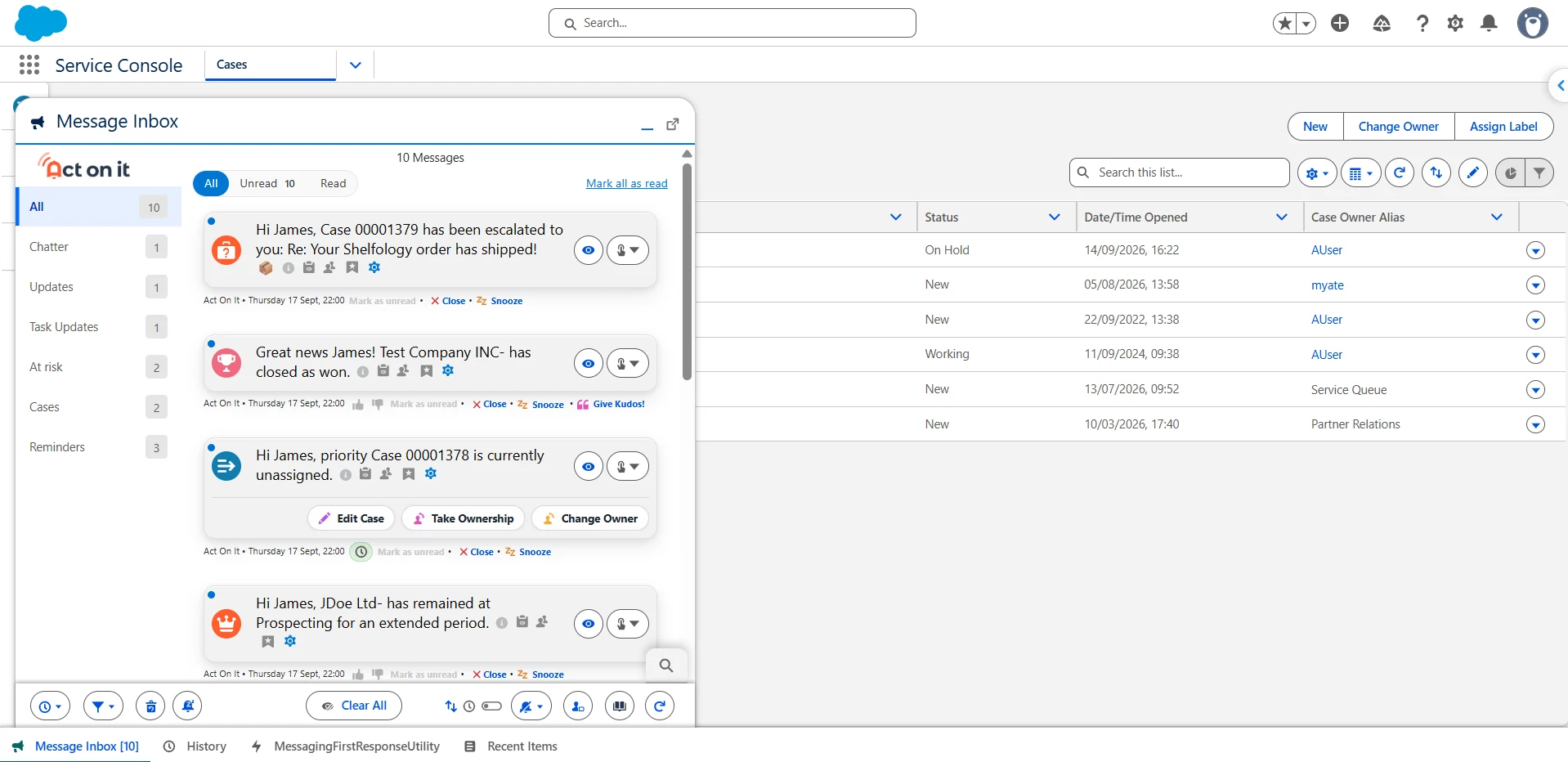
An unread email is a message. An unactioned alert is a job. That difference matters, so alerts in Act On It behave like work rather than post. When the work is done, you clear it and it stops asking.
Alerts arrive in one inbox and stay visible until someone deals with them. You can finish the job from inside the alert. Call the contact, send the reply, reassign the owner, approve the request, edit the fields, run a Flow, complete and clear. No hunting for the record. No four open tabs.
You can act from your phone too. That matters more than it sounds when the person who needs to approve something is standing in a car park.
Knowing who read it, and what they did next
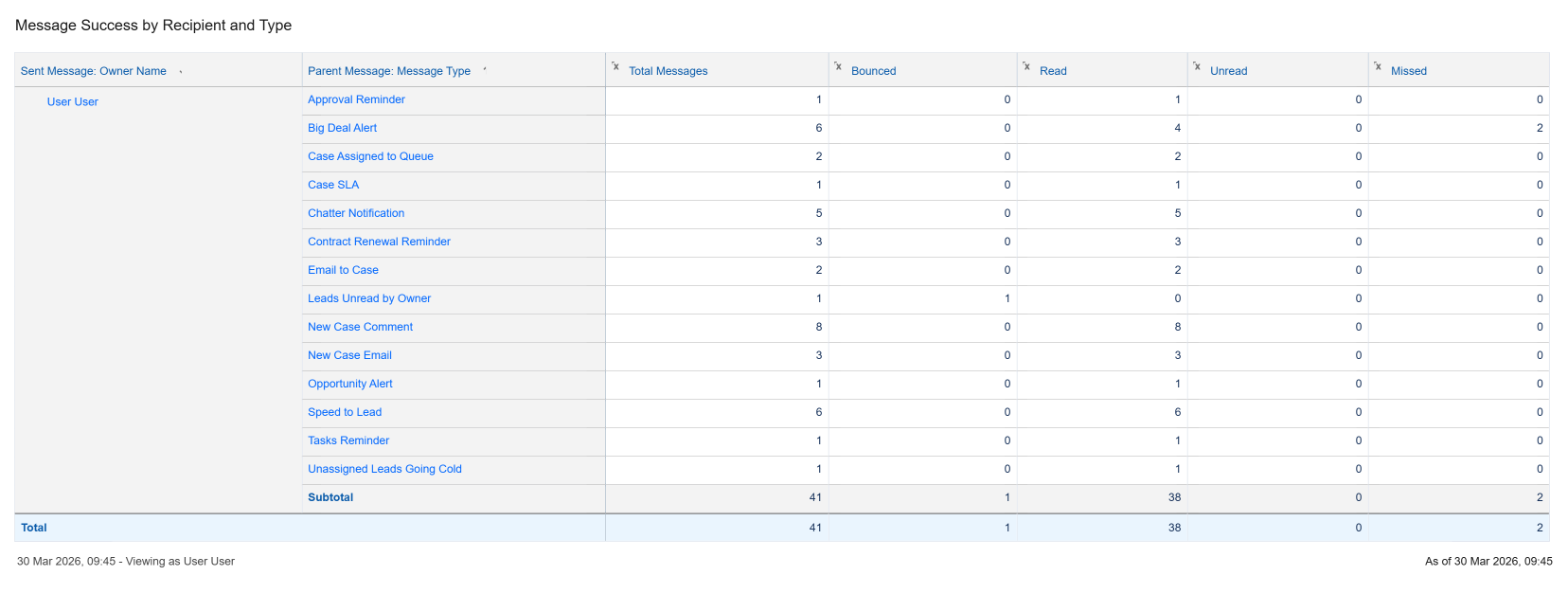
Most alerting tools consider their job finished at sent. Ours keeps going to done, and records every step on the way, per person, with a timestamp.
- 09:02Delivered
- 09:02Received
- 09:11Read
- 09:12Opened the record
- 09:19Took an action
- 09:26Completed
That means you can answer questions like these. Did she see it? When? Did anyone open the record, or just clear the notification? How long does this team take to respond at nine o’clock on a Monday, not on average?
It is also what makes response targets mean something. Set a target and measure it in business hours, so the clock doesn’t run all night against someone who was asleep. Then grade what happened. If a colleague got there first, nobody else is marked late. The point was that the customer got looked after.
Letting people turn us off
A strange feature for an alerting product to spend months on. We did it on purpose.
People can snooze an alert until this afternoon, mute themselves during a workshop, and choose what pops, what pings and what waits quietly. They can say an alert wasn’t useful, and the admin sees how often that happens.
An alert people have trained themselves to ignore is worse than no alert at all. It costs the same attention and takes the next ten alerts down with it. Five notifications people act on beat fifty they swat away.
Native to Salesforce
Act On It runs entirely inside your Salesforce org, like the rest of what you’ve built.
Your data stays in your org. Act On It respects your sharing rules and field-level security because it is subject to them. There is no middleware, no external service and no separate uptime to watch. It works with Flow because it lives in the same place Flow does.
When a big deal closes, the person who closed it gets confetti. It serves no strategic purpose and has never appeared in a business case. People love it, and it is staying.
"Gone from multiple manual checkpoints in my diary to proactively being delivered the information when required. Reduction in training time, reduced client wait times, and risk flagged to agents and managers in the moment."
Questions people ask
How do I get alerted when a lead hasn't been contacted in Salesforce?
Salesforce automation runs when a record is saved, so on its own it can't notice a call that never happened. Act On It runs scheduled checks against conditions you choose, such as a new lead with no contact after two days. It alerts the owner, or anyone else you name, in an inbox where they can act straight away.
Can I see whether anyone actually read a Salesforce notification?
Yes. For every recipient, Act On It records when an alert was delivered, received and read, when the record was opened, when the first action was taken and when the work was completed. It is stored in your org, so you can report on it like any other Salesforce data.
How do I measure SLA response times in Salesforce using business hours?
Set a response target on the alert and choose which events count as a response. Act On It measures each response against your Salesforce business hours, so the clock only runs when your team is working. If a colleague responds first, nobody else is marked late.
Is Act On It native to Salesforce?
Yes. Act On It is a managed package installed from the AppExchange that runs entirely inside your Salesforce org. Your data stays in your org, it respects your sharing rules and field-level security, and it works alongside Flow.